Short answer: turn on Voice message transcripts in WhatsApp (Settings, Chats), then long-press a voice message and tap Transcribe. That covers most short messages. For a long one, or when you want the text saved, summarised and searchable, share the message to Lyonesse. It transcribes on your iPhone.
Use WhatsApp's own transcript first
WhatsApp added transcripts for voice messages in November 2024. On iPhone you open Settings, then Chats, then Voice message transcripts, switch it on and pick a language. Then long-press any voice message and tap Transcribe. WhatsApp doesn't transcribe messages on its own, so you ask for each one.
The languages on iPhone depend on your iOS version. TechCrunch's launch report lists English, Spanish, French, German, Italian, Japanese, Korean, Portuguese, Russian, Turkish, Chinese and Arabic on iOS 16 and later, with Danish, Finnish, Malay, Norwegian, Dutch, Swedish, Hebrew and Thai added on iOS 17 and later. That list is from the launch. We haven't re-tested it on a current build, so check the setting on your own phone. If the option is missing, update WhatsApp and iOS.
WhatsApp says these transcripts are generated on your device and that nobody else can read them. That's WhatsApp's claim, and we haven't checked it, so read WhatsApp's help centre for the current wording.
When that isn't enough
The built-in transcript lives inside the chat. These are the cases where people end up wanting something else:
- The message is long, and you'd rather have a summary than a wall of text.
- You want the words somewhere that isn't the chat, so you can copy them, export them or keep them after the chat is cleared.
- You want to search across many messages for one thing someone said.
- The message is in a language WhatsApp doesn't offer. Lyonesse has 15 transcription languages in its language picker.
- The audio came from somewhere else and was forwarded to you as a file.
Import a WhatsApp voice message into Lyonesse
A WhatsApp voice message is an audio file in the Opus format, saved with an .opus extension. Lyonesse's importer lists .opus and .ogg alongside .mp3, .m4a, .wav, .aiff, .aac and .flac. Here is the route.
- In WhatsApp, long-press the voice message and choose Forward, then tap the share icon. The exact menu names move around between WhatsApp versions.
- Pick Lyonesse in the share sheet. Lyonesse opens and starts importing the file.
- If Lyonesse isn't in the share row, choose Save to Files instead. Then open Lyonesse and import the file from Files.
- Wait for the transcript. It's made on the phone, so it works in airplane mode.
- Open the item to read the transcript. You can ask for a summary, ask a question about what was said, or search for a word later.
The free version of Lyonesse holds one recording, which is enough to try this with a real message. If you've already used it, sharing another file will bring up the paywall.
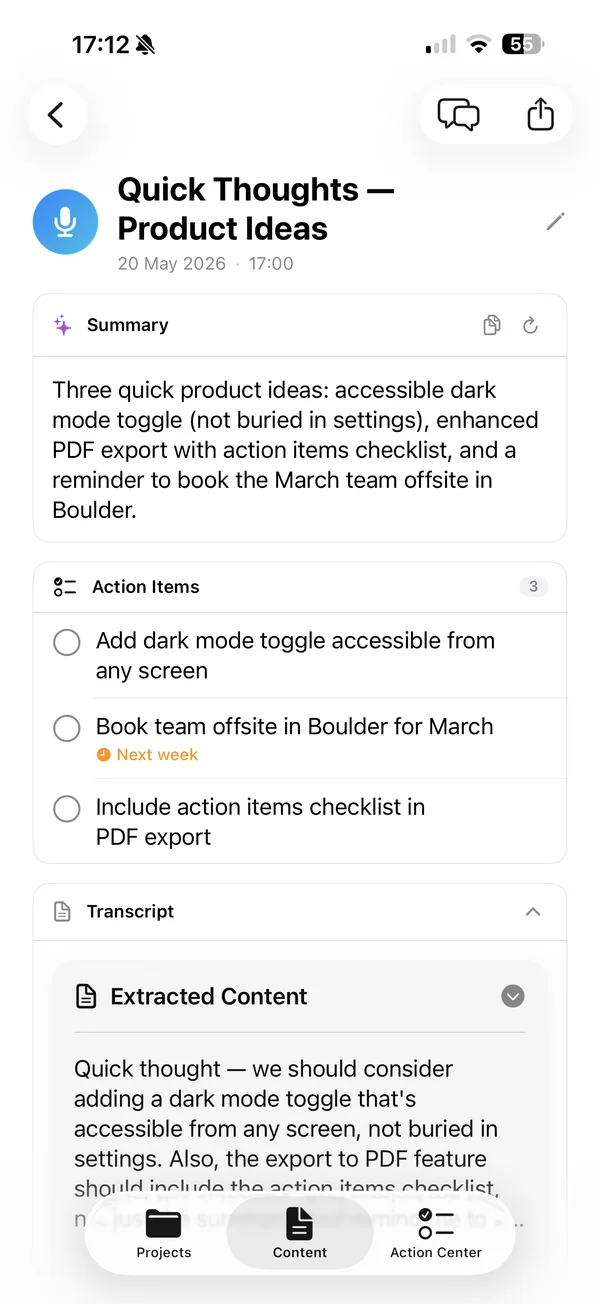
The screenshot is a sample recording of our own, not a WhatsApp message.
Get Lyonesse
Import the message, read the text, and keep it on your iPhone.
Get Lyonesse on the App StoreWhat about phone call recordings?
Apple's Phone app can record and transcribe a call in some countries, regions and languages, only for a call with one other person. Both people hear a notice that the call is being recorded, and the recording is saved to a Call Recordings folder in Notes. Apple's guide has the current country list, which excludes the European Union, among others. Ask the other person first. WhatsApp calls are a separate thing and aren't covered by this.
If you end up with a call recording as a file, you can import it the same way as a voice message.
What stays on your iPhone
With Lyonesse, transcription, summaries and question answering run on the phone, and the imported message isn't uploaded for transcription. iCloud sync is a separate option that is off until you turn it on. What WhatsApp itself does with a message in your chat is WhatsApp's business, so use its help centre for that.
Related reading
- Transcribe voice memos on iPhone, for recordings made in Apple's own app
- How to transcribe audio on iPhone
- Transcribe audio offline with no account
Frequently asked questions
Can I transcribe a WhatsApp voice message on iPhone?
Yes. WhatsApp can transcribe a message itself if you turn on Voice message transcripts in Settings, Chats. For a longer message, a saved transcript or a summary, share the message to Lyonesse and it transcribes on the phone.
Does WhatsApp send my voice messages away to transcribe them?
WhatsApp says its transcripts are generated on your device and that no one else, including WhatsApp, can read them. Check WhatsApp's own help page for the current wording. Lyonesse transcribes on the iPhone and has no cloud transcription step.
Can I read a voice message without playing it?
Yes. Long-press the message in WhatsApp and tap Transcribe, once the setting is on and your language is supported. Otherwise import the message into Lyonesse and read the transcript.
What file format are WhatsApp voice messages?
WhatsApp stores voice messages as Opus audio, and a saved message has an .opus extension. Lyonesse lists .opus and .ogg among the audio types it imports.